

Monitoring Violations
Track and analyze policy violations
Monitoring Violations
Rahal tracks all policy violations to help you understand travel patterns and improve policies. This guide covers how to access and analyze violation data.
Accessing Violation Data
There are two ways to view violation data:
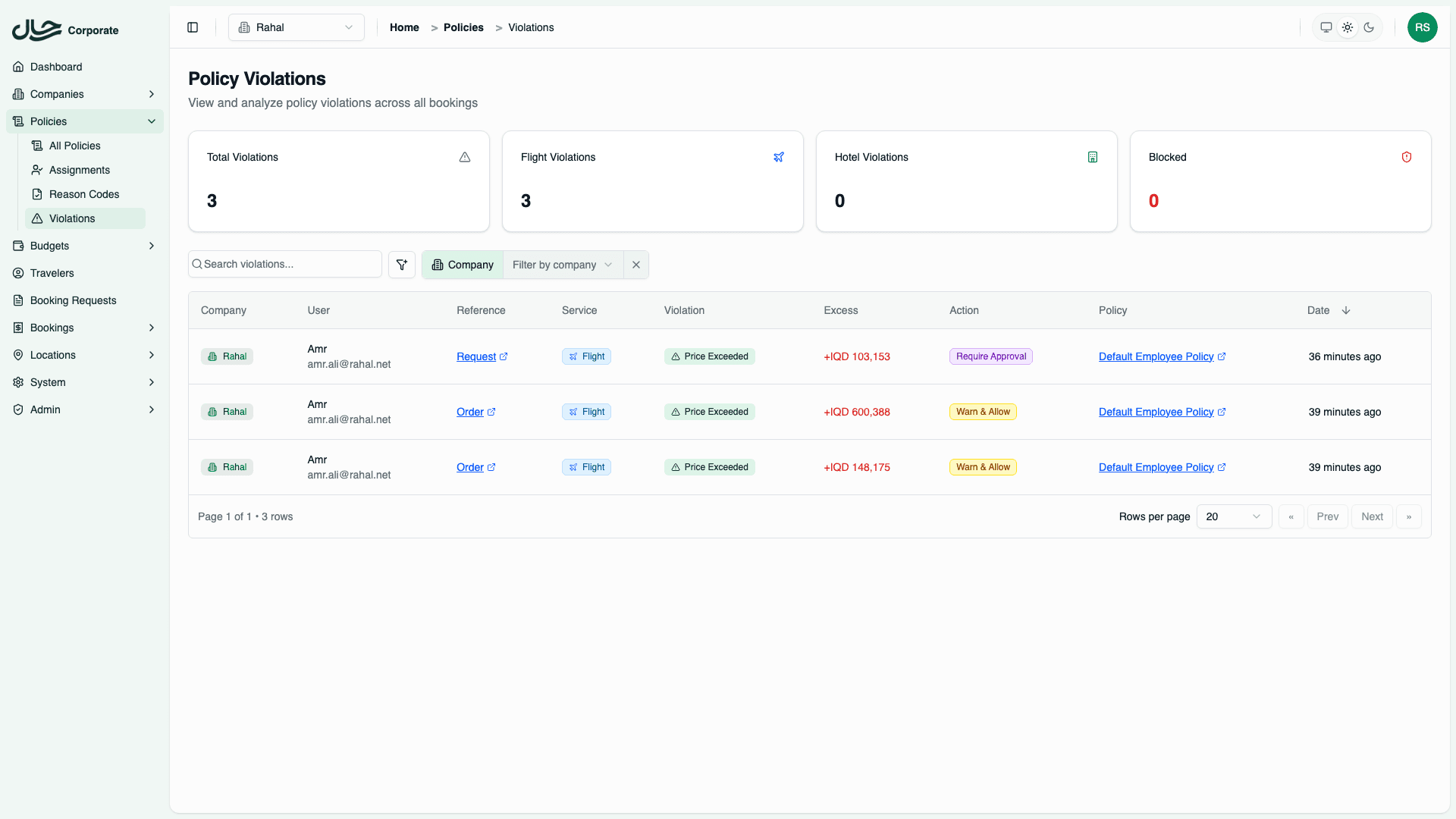
Company-Wide Violations Page
- Go to Policies → Violations in the sidebar
- Select your company (if you manage multiple)
- View all violations across all policies
This page shows:
- Stats Cards - Total violations, flight violations, hotel violations, blocked bookings
- Violations Table - Detailed list with filtering options
Policy-Specific Violations
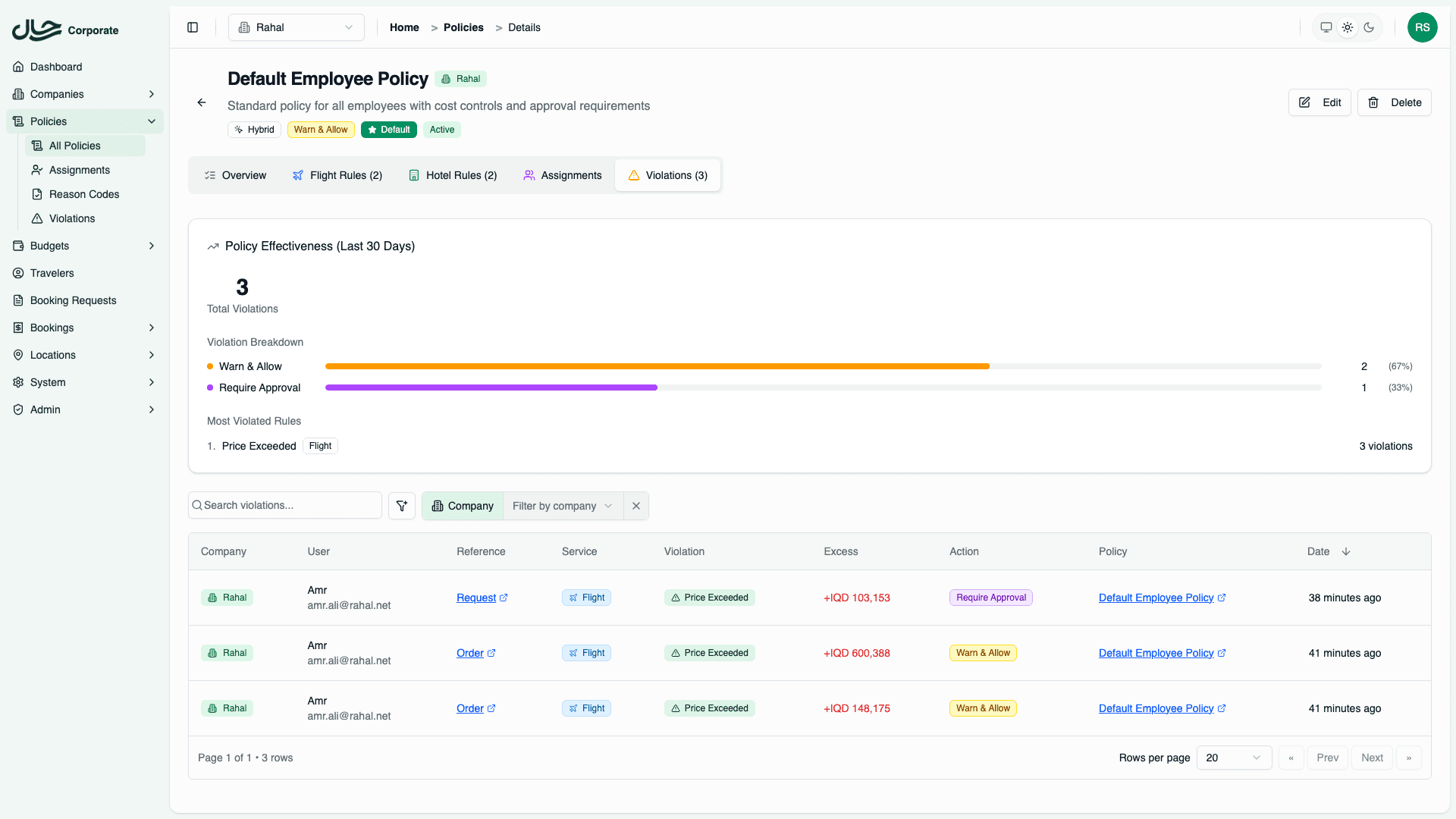
- Open a specific policy
- Go to the Violations tab
- View violations for that policy only
This tab shows:
- Policy Effectiveness Card - Violation trends and top violated rules
- Violations Table - Filtered to this policy
Policy Effectiveness Analytics
The Policy Effectiveness card on both the Overview and Violations tabs shows:
| Metric | Description |
|---|---|
| Total Violations | Count of violations in the last 30 days |
| Breakdown by Action | Percentage of violations by action type (Allow, Warn, Require Approval, Block) |
| Top Violated Rules | The 5 rules that trigger the most violations |
This helps you identify:
- Which rules are too restrictive (high approval rate)
- Which rules are being ignored (many "allow" violations)
- Whether budgets need adjustment
Violations Table
The violations table shows:
| Column | Description |
|---|---|
| Date | When the violation occurred |
| User | Employee who triggered the violation |
| Policy | Which policy was violated |
| Service | Flight or Hotel |
| Type | Violation type (Price, Cabin Class, etc.) |
| Amount | Excess amount (for price violations) |
| Action | What happened (Allowed, Required Approval, Blocked) |
Filtering Violations
By Date Range
- Click the date filter
- Select start and end dates
- Apply filter
By Company
- Select a company from the dropdown (if you manage multiple)
- View violations for that company only
By Service Type
Filter by:
- Flights - Flight violations only
- Hotels - Hotel violations only
- All - Both types
By Violation Type
Filter by specific violation types:
- Price exceeded
- Cabin class not allowed
- Star rating not allowed
- Too many stops
- Insufficient advance booking
- Nights exceeded
By Action
Filter by:
- Allow - Violations that were allowed
- Warn and Allow - Violations where user acknowledged warning
- Require Approval - Violations requiring approval
- Block - Blocked violations
Violation Details
Click on any violation to see full details:
- Booking information - Flight/hotel details
- Policy rule matched - Which rule triggered the violation
- Violation specifics - Exactly what was violated
- Reason code - User's justification (if provided)
- Notes - Additional context from user
- Resolution - Who approved/rejected, when, with what notes
Exporting Data
Export violations for reporting:
- Apply any filters you want
- Click Export CSV
- Download the file
The export includes all visible columns and respects current filters.
Analyzing Trends
Common Questions
Which violations occur most?
- View all violations
- Sort by violation type
- Identify patterns
Who violates policy most?
- Filter by date range
- Group by user (export and analyze)
- Review top violators
Are budgets realistic?
- Filter by "Price exceeded"
- Look at excess amounts
- If many small excesses, budgets may be too tight
Which routes need attention?
- Filter flight violations
- Look for patterns by origin/destination
- Consider route-specific rules
Using Insights
Based on violation analysis:
| Finding | Action |
|---|---|
| Many small price violations | Increase budgets slightly |
| Frequent cabin class violations | Add duration tiers for upgrades |
| Specific route violations | Create route-specific rule |
| High approval rate | Consider loosening policy |
| Consistent "No alternatives" | Policy may be too restrictive |
Resolution Tracking
For violations requiring approval:
Pending
- Request submitted, awaiting review
- Appears in admin's booking requests
Approved
- Admin approved the request
- Shows who approved and when
- May include approval notes
Rejected
- Admin rejected the request
- Shows who rejected and when
- Should include rejection reason
Notifications
Configure violation notifications:
- Go to company settings
- Find notification preferences
- Enable alerts for:
- High-value violations
- Blocked bookings
- Pending approvals
Best Practices
- Review weekly - Regular monitoring catches issues early
- Look for patterns - Individual violations matter less than trends
- Act on insights - Use data to improve policies
- Follow up on blocks - Blocked bookings may indicate policy gaps
- Track approval rates - Very high rates suggest policy is too strict
- Export for stakeholders - Share violation reports with management