

Configuring Hotel Rules
Set up hotel policy rules with locations, price limits, and star ratings
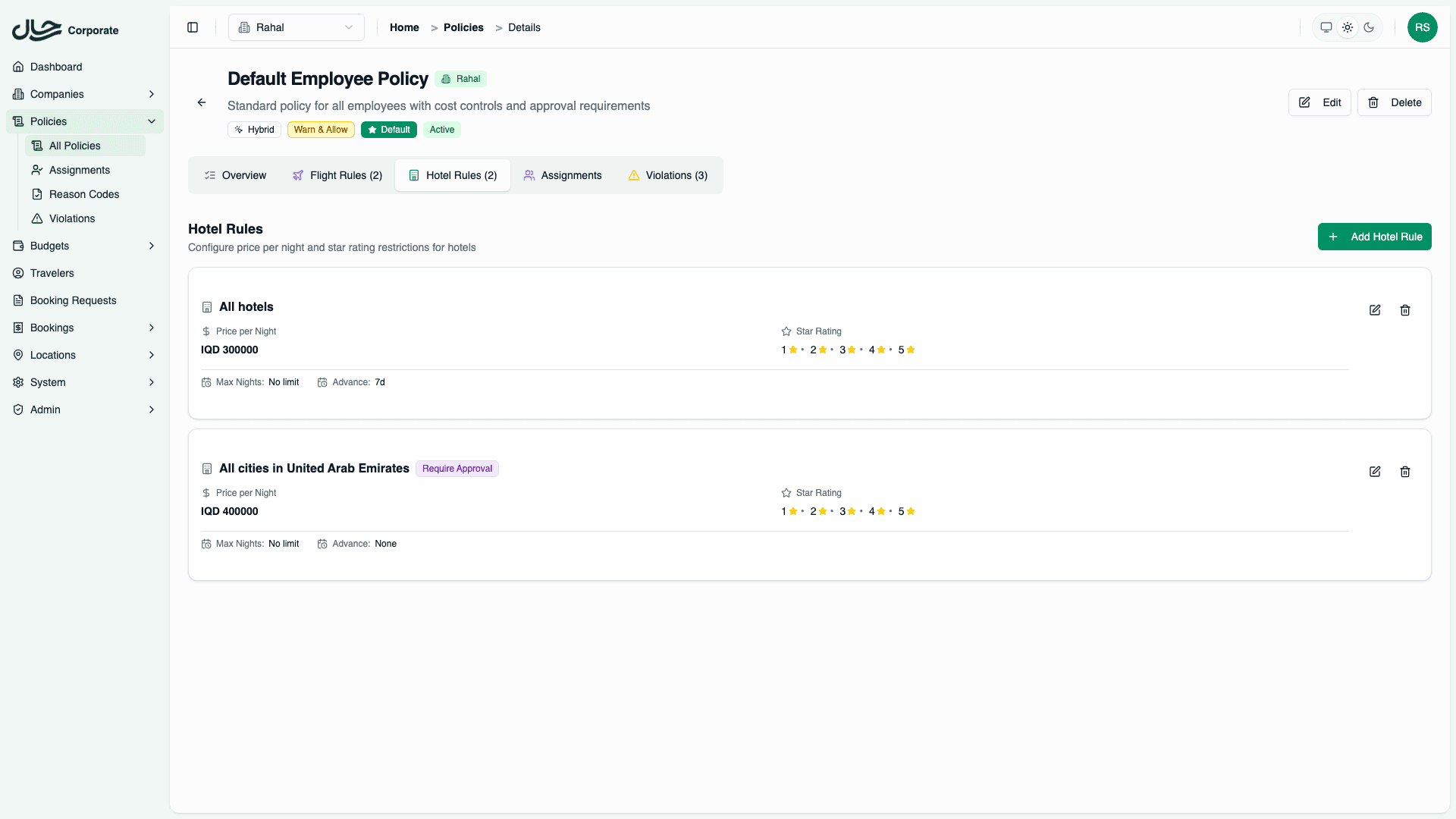
Configuring Hotel Rules
Hotel rules define what hotels employees can book, at what price, and with what quality standards. This guide covers how to create and configure hotel rules.
Accessing Hotel Rules
- Go to Policies and open a policy
- Click the Hotel Rules tab
- Click Add Rule to create a new rule
Rule Configuration
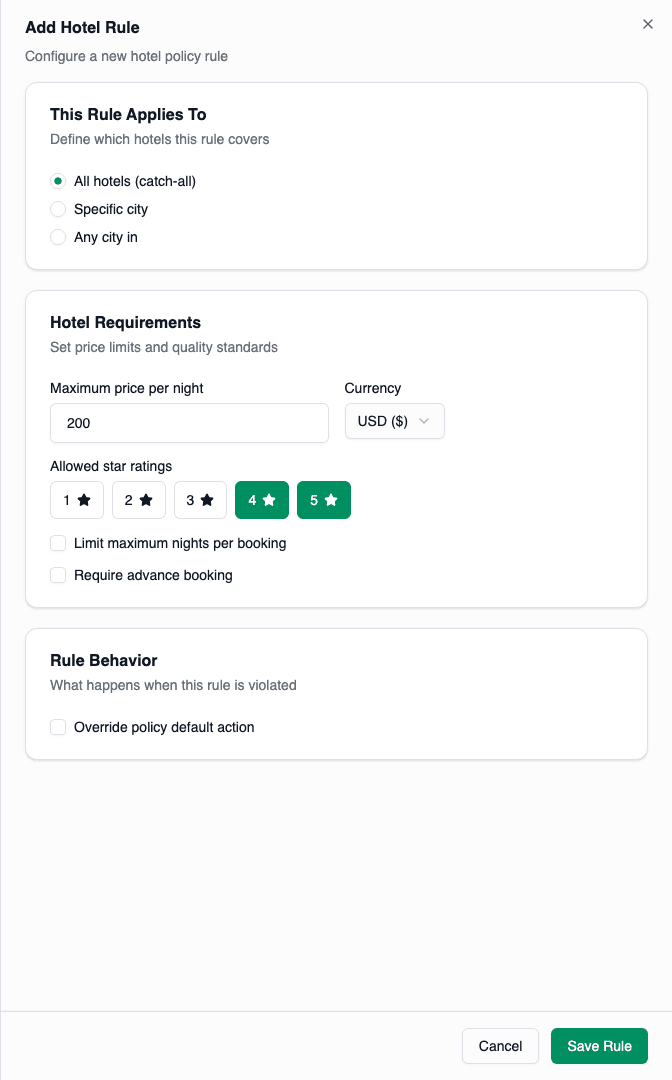
Section 1: Location Matching
Choose which hotels this rule applies to:
| Option | Description | Priority |
|---|---|---|
| All hotels | Catch-all rule | 100 (lowest) |
| Specific city | Hotels in one city (e.g., Dubai) | 10 (highest) |
| Any city in [Country] | All hotels in a country | 50 |
For specific city:
- Select "Specific city"
- Search and select the city
For country:
- Select "Any city in [Country]"
- Select the country
Section 2: Price Limit
Set the maximum price per night:
- Enter the maximum price (e.g., 150)
- Select the currency (USD, EUR, IQD, etc.)
The system automatically converts currencies when evaluating bookings.
Tips for setting prices:
- Check average hotel prices in target destinations
- Account for peak seasons
- Consider location differences (city center vs. suburbs)
Section 3: Star Rating
Select allowed hotel ratings:
- ⭐ 1 Star
- ⭐⭐ 2 Stars
- ⭐⭐⭐ 3 Stars
- ⭐⭐⭐⭐ 4 Stars
- ⭐⭐⭐⭐⭐ 5 Stars
Click each rating to toggle it on/off.
Common configurations:
- Budget: 2-3 stars
- Standard: 3-4 stars
- Executive: 4-5 stars
Section 4: Stay Requirements
Maximum Nights
Limit stay length per booking:
- Check "Limit maximum nights"
- Enter maximum nights (e.g., 7)
Bookings exceeding this limit will violate the rule.
Use cases:
- Prevent extended personal stays
- Require corporate housing for long projects
- Control costs on open-ended travel
Advance Booking
Require bookings to be made in advance:
- Check "Require advance booking"
- Enter minimum days (e.g., 5)
Bookings made less than 5 days before check-in will violate this rule.
Section 5: Action Override
By default, violations use the policy's default action. To override for this specific rule:
- Check "Override policy default action"
- Select the action:
- Allow
- Warn and Allow
- Require Approval
- Block
Common use case: Block 5-star hotels or require approval for expensive destinations.
Saving the Rule
Click Save Rule when done. The rule appears in the Hotel Rules table.
Managing Rules
Edit a Rule
- Click the Edit button on the rule row
- Make changes
- Click Save
Delete a Rule
- Click the Delete button on the rule row
- Confirm deletion
Example Configurations
Standard Domestic
Location: Any city in Iraq
Price: 100 USD per night
Stars: 3, 4 stars
Max Nights: 7
Advance: 3 days
Action: (use policy default)
Gulf Business Hub
Location: Hotels in Dubai
Price: 250 USD per night
Stars: 4, 5 stars
Max Nights: 10
Advance: 5 days
Action: (use policy default)
Budget International
Location: All hotels
Price: 120 USD per night
Stars: 3 stars only
Max Nights: 5
Advance: 7 days
Action: (use policy default)
Luxury Block
Location: All hotels
Price: 400+ USD per night
Stars: 5 stars
Action: BLOCK (override)
This catches luxury hotel bookings and blocks them.
Extended Stay Approval
Location: All hotels
Price: (any)
Stars: (any)
Max Nights: 14+ nights
Action: REQUIRE_APPROVAL (override)
This requires approval for stays longer than 2 weeks.
Location-Specific Pricing
Hotel prices vary dramatically by city. Consider creating city-specific rules:
| City | Suggested Max Price |
|---|---|
| Dubai | $200-300/night |
| Baghdad | $80-120/night |
| London | $250-350/night |
| New York | $300-400/night |
| Regional cities | $60-100/night |
Strategy:
- Create specific rules for expensive cities
- Create country rules for moderate destinations
- Use catch-all for remaining locations
Best Practices
- Consider local market rates - Research average hotel prices for each destination
- Balance quality and cost - 3-4 star hotels often provide best value
- Account for business needs - Location and amenities may justify higher prices
- Set reasonable night limits - Long stays should be reviewed
- Review seasonally - Prices fluctuate during peak travel periods
- Test your rules - Use policy preview to verify behavior