

Reason Codes
Create and manage reason codes for policy violations
Reason Codes
Reason codes allow employees to explain why they're booking out-of-policy travel. When a booking requires approval, users can select a reason code to justify the exception.
What Are Reason Codes?
Reason codes are predefined justifications that employees select when:
- Booking travel that violates policy
- Submitting a booking request for approval
- Explaining why they need an exception
Benefits:
- Standardize exception justifications
- Track why violations occur
- Inform policy improvements
- Simplify the approval process
Accessing Reason Codes
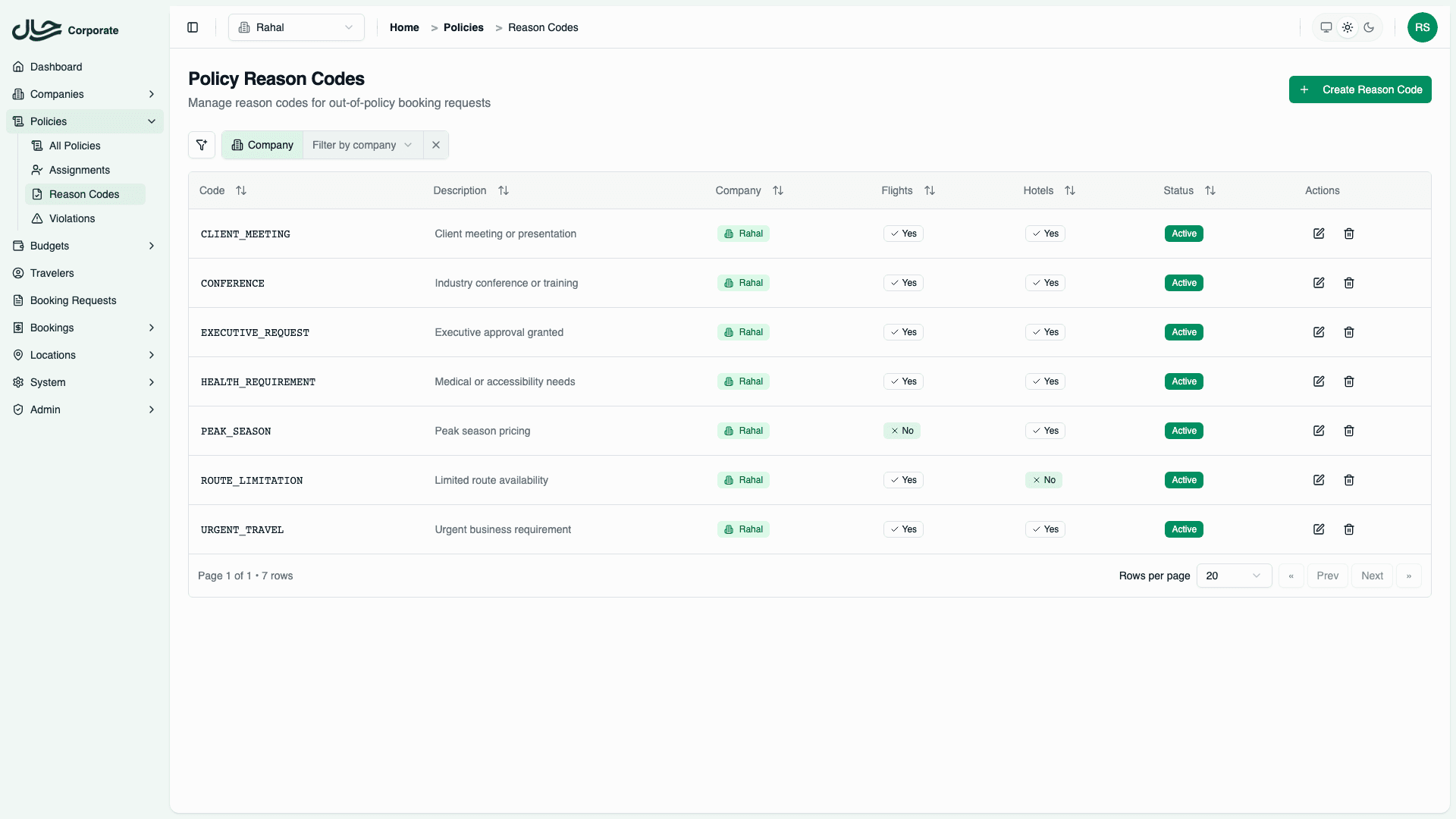
- Go to Policies → Reason Codes
- View the list of existing codes
- Create, edit, or delete codes
Creating a Reason Code
- Click Create Reason Code
- Fill in the form:
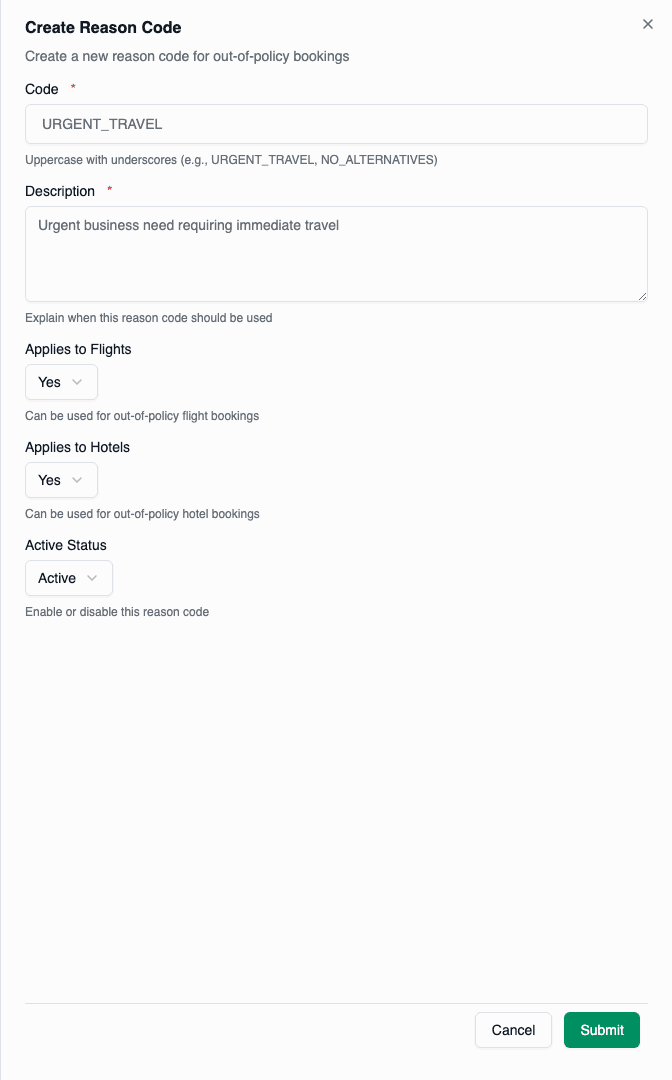
Code
A short identifier using uppercase letters, numbers, and underscores:
- ✅
URGENT_TRAVEL - ✅
CLIENT_REQUEST - ✅
NO_ALTERNATIVES - ❌
urgent travel(no spaces or lowercase)
Description
Explain when this code should be used:
- ✅ "Travel is required urgently due to unforeseen circumstances"
- ✅ "Client specifically requested this hotel/flight"
- ❌ "For urgent stuff" (too vague)
Applicability
Select which booking types this code applies to:
- Flights: Reason code available for flight violations
- Hotels: Reason code available for hotel violations
- Both: Available for all violations
Status
- Active: Code is available for selection
- Inactive: Code is hidden but preserved for historical data
- Click Create
Managing Reason Codes
Edit a Code
- Find the code in the list
- Click Edit
- Make changes
- Click Save
Editing a code updates it everywhere. Historical violations keep the updated description.
Deactivate a Code
Instead of deleting, deactivate codes that are no longer needed:
- Edit the reason code
- Change status to Inactive
- Save
Inactive codes:
- Don't appear in selection lists
- Remain on historical violations
- Can be reactivated later
Delete a Code
- Click Delete on the code row
- Confirm deletion
Deleted codes are permanently removed. Historical violations will show the code as deleted.
Common Reason Codes
Here are suggested reason codes to start with:
Travel Necessity
| Code | Description |
|---|---|
URGENT_TRAVEL | Travel required urgently due to unforeseen circumstances |
EMERGENCY | Personal or business emergency requiring immediate travel |
CLIENT_REQUEST | Client specifically requested this option |
MEETING_REQUIREMENT | Required to attend a specific meeting or event |
Availability
| Code | Description |
|---|---|
NO_ALTERNATIVES | No in-policy alternatives available |
SOLD_OUT | In-policy options were sold out |
SCHEDULE_CONFLICT | In-policy options don't fit required schedule |
LOCATION_REQUIRED | Specific location required for business purposes |
Comfort/Health
| Code | Description |
|---|---|
MEDICAL_NEED | Medical condition requires upgraded accommodation |
LONG_FLIGHT | Long flight duration justifies cabin upgrade |
OVERNIGHT_FLIGHT | Red-eye flight requires better rest conditions |
Cost Efficiency
| Code | Description |
|---|---|
TOTAL_COST_LOWER | Higher per-night cost but shorter stay = lower total |
BUNDLED_SAVINGS | Package deal provides overall savings |
Using Reason Codes
During Booking
When an employee books out-of-policy:
- System shows policy violation
- If action is
REQUIRE_APPROVAL, reason code selector appears - Employee selects applicable reason code
- Optionally adds notes for more context
- Submits booking request
In Approval Workflow
Admins reviewing requests see:
- Selected reason code
- Additional notes
- Violation details
This context helps make informed approval decisions.
Analyzing Reason Code Usage
Track which reason codes are used most:
- Go to Policies → Violations
- Filter by reason code
- Review trends
Insights you might find:
- "NO_ALTERNATIVES" used frequently → Policy too restrictive
- "CLIENT_REQUEST" common → May need client-specific policies
- "URGENT_TRAVEL" increasing → Review advance booking requirements
Best Practices
- Start with common scenarios - Create 5-10 codes covering typical exceptions
- Be specific - Vague codes don't provide useful information
- Review usage - Add new codes based on "Other" selections
- Keep active list manageable - Too many codes confuses users
- Use consistent naming -
CATEGORY_DETAILformat works well - Write clear descriptions - Users should understand when to select each code