

Policy Status
Understanding policy status indicators during booking
Policy Status Indicators
When booking travel, you'll see policy status indicators that show whether your selection complies with company policy. These appear throughout your booking journey.
Where Status Appears
Search Results
Each flight or hotel card in search results shows a small policy status badge:
- Hidden - When the option is within policy, no badge appears
- Amber badge - Option requires approval or has warnings
- Red badge - Option is blocked by policy
Click the badge to see violation details.
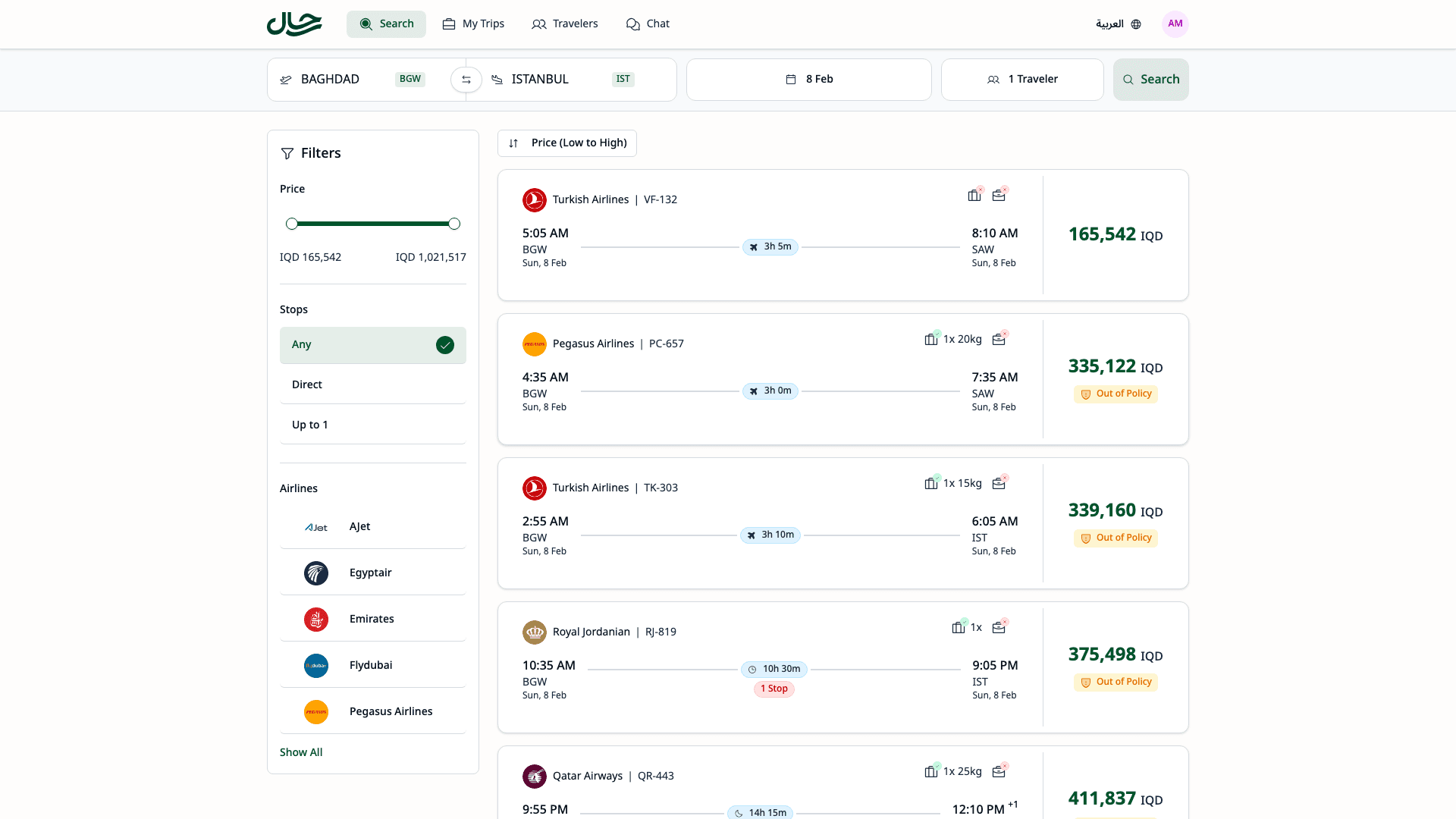
Here's a closer look at a flight card with an "Out of Policy" badge:

Booking Review Page
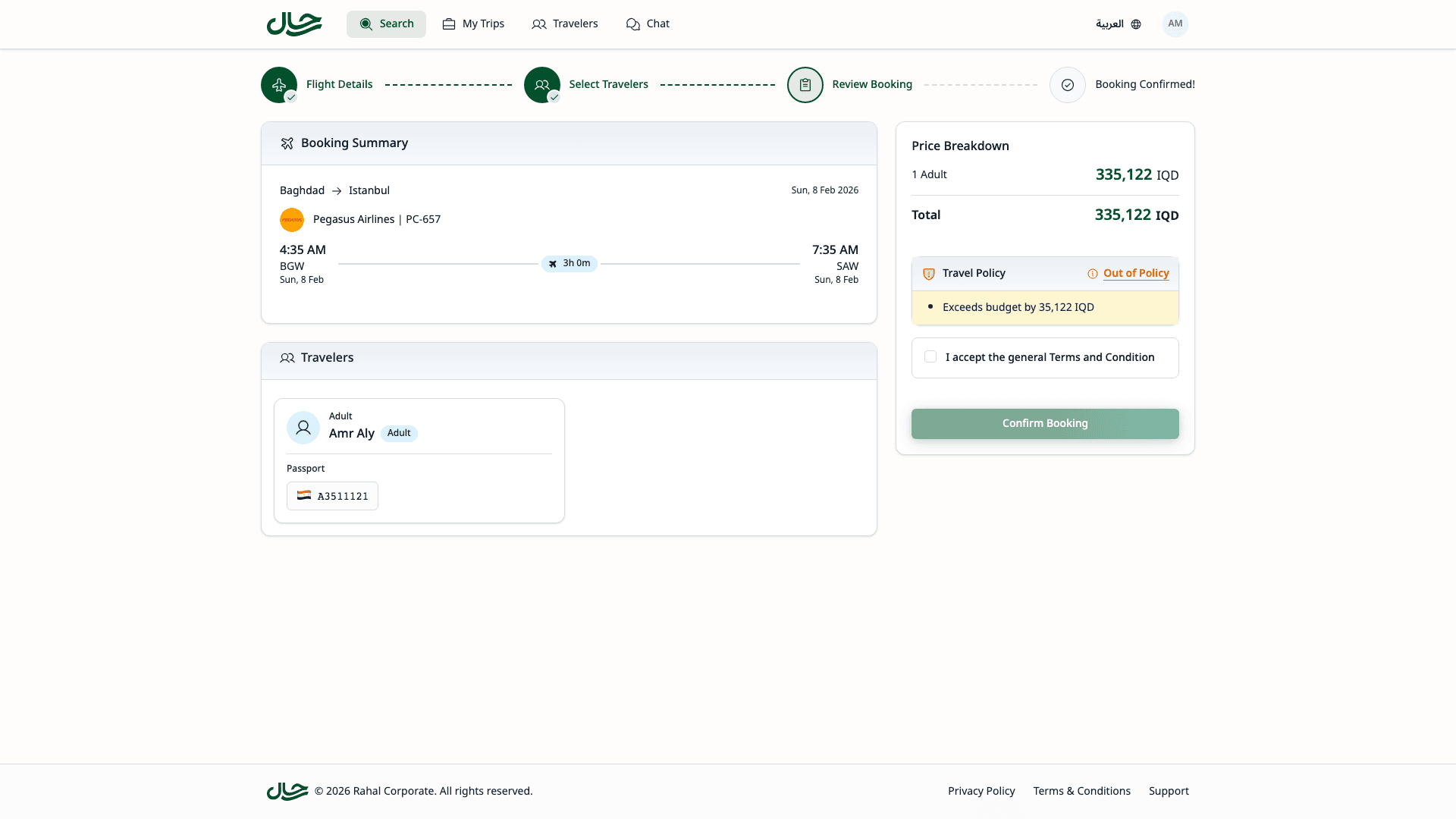
On the review page before confirming, you'll see a full policy status card:
- Desktop - Policy card appears in the right sidebar
- Mobile - Policy card appears below the booking summary
The card shows:
- Overall policy status (Within Policy, Requires Approval, or Blocked)
- List of violations if any
- Click the status text to view the matched policy rule details
When a flight is within policy, no badge is displayed. Policy badges only appear on flights that have violations.
Status Types
Within Policy
Your selection complies with all policy requirements.
What you see:
- Green shield icon with checkmark
- "Within Policy" message
- "Confirm Booking" button is enabled
What it means:
- Price is within budget
- Cabin class / star rating is allowed
- All other requirements met
What to do:
- Proceed with booking normally
Requires Approval
Your selection violates one or more policy requirements that require manager approval.
What you see:
- Amber shield icon with warning
- "Requires Approval" message
- List of violations
- "Submit Request" button instead of "Confirm Booking"
- Reason code selector and notes field
What it means:
- Price exceeds budget, OR
- Cabin class / star rating not preferred, OR
- Other policy limits exceeded
What to do:
- Review the violations listed
- Either:
- Choose a different option that's within policy
- Submit for approval with a reason code and notes
Blocked
Your selection is not permitted by company policy.
What you see:
- Red shield icon with slash
- "Not Allowed" message
- "Confirm Booking" button is disabled
- List of violations
What it means:
- Selection violates a hard limit (e.g., First Class blocked)
- Cannot proceed with this selection
What to do:
- Choose a different option
- If you believe this is an error, contact your travel administrator
Viewing Matched Rule Details
To see exactly what policy rule applies to your selection:
- Click the info button on the policy status card
- A dialog or drawer opens showing:
- For flights: Route, budget limit, allowed cabin classes, max stops, advance booking requirement
- For hotels: Location, price per night limit, allowed star ratings, max nights, advance booking requirement
This helps you understand why your selection is or isn't compliant and what alternatives might work.
Violation Messages
Common messages you might see:
| Message | Meaning |
|---|---|
| "Exceeds budget by X" | Price is X amount over the allowed limit |
| "Cabin class not allowed" | Selected cabin class is not permitted |
| "Star rating not allowed" | Hotel rating is not permitted |
| "Maximum stops exceeded" | Flight has too many connections |
| "Advance booking required" | Must book further in advance |
| "Maximum nights exceeded" | Hotel stay is too long |
Tips
- Check badges early - Look for policy badges on search results before selecting
- Compare options - Look for in-policy alternatives without badges
- Understand your limits - Know your budget and class restrictions
- Book in advance - Last-minute bookings may violate policy
- Use reason codes - When requesting approval, select the most appropriate reason
- Add notes - Explain why you need the out-of-policy option