

Booking for Delegated Travelers
Understanding how to book travel for other users' travelers
Booking for Delegated Travelers
Delegation allows you to book travel for travelers owned by other users. This guide explains how delegation affects the booking process.
For a complete step-by-step guide, see Booking as Delegate.
What is Delegation?
Delegation is when a user grants you access to their travelers:
Delegation can be set up by administrators or granted by users themselves from the Delegation page.
Delegation Scopes
Delegation can include different levels of access:
| Scope | What You Can Do |
|---|---|
| View Travelers | See traveler names and basic info |
| Create Bookings | Book travel for delegated travelers |
| View Bookings | See booking history for delegated travelers |
| Manage Travelers | Add/edit travelers for the delegating user |
| Cancel Bookings | Cancel bookings created for the delegating user |
Most delegations include View Travelers and Create Bookings scopes by default.
How Delegated Travelers Appear
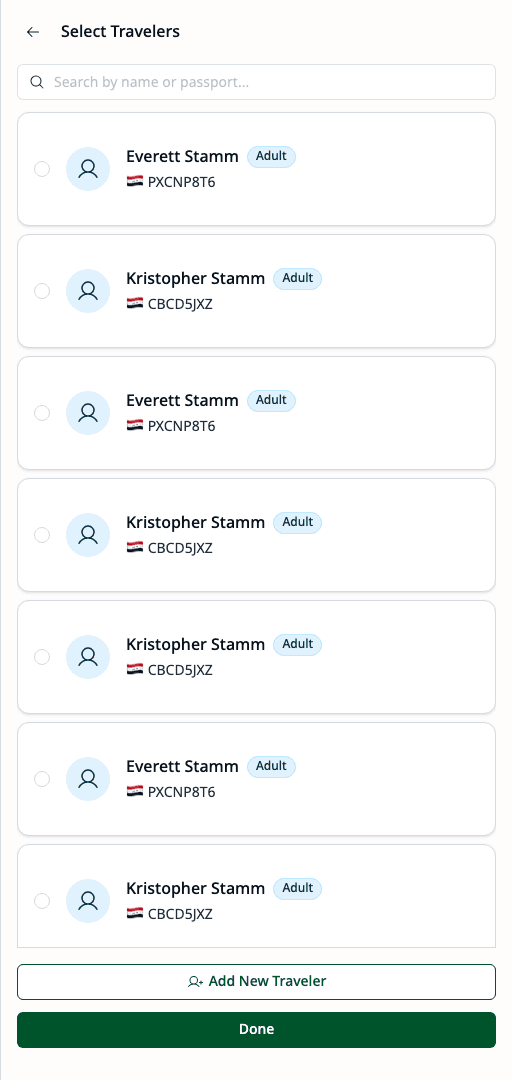
When booking for a delegator, you use the booking context selector to switch to their context. Once selected, the traveler selection shows their travelers.
Identification
Delegated travelers show:
- The traveler's name and details
- Traveler type (Adult, Child, or Infant)
- Primary passport nationality
Booking with Delegated Travelers
When you book for delegated travelers:
Policy Evaluation
Policies are evaluated based on the delegating user (traveler owner), not you.
- The traveler owner's policy applies
- Budget consumption uses the owner's budget
- Approval routing follows the owner's hierarchy
Budget Attribution
- Travel costs count against the owner's budget
- Not your personal budget
- Budget availability is checked during booking
Booking Attribution
The booking shows:
- Booked by: You (the booker)
- On behalf of: The traveler owner
- Travelers: The delegated travelers included
Context Locking
Once you select a booking context (yourself or a delegator), it becomes locked for that booking session. You cannot mix travelers from different owners in a single booking.

If you need to switch context after selecting travelers, you must clear your selection first.
What You Can Do
Your capabilities depend on the delegation scopes granted:
| If You Have | You Can |
|---|---|
| View Travelers | See their travelers in the travelers page |
| Create Bookings | Book flights and hotels for their travelers |
| Manage Travelers | Add, edit, and delete their travelers |
| View Bookings | See bookings you created for them |
| Cancel Bookings | Cancel bookings created for them |
Without the Manage Travelers scope, you cannot edit or delete the delegator's travelers.
Common Scenarios
Executive Assistant
When booking travel for your manager:
- Manager delegates their travelers to you
- You search and select flights
- Select manager's travelers (delegated)
- Manager's policy and budget apply
- Submit booking on their behalf
Travel Coordinator
When booking for multiple department members:
- Department members delegate to you
- You book for any delegated traveler
- Each booking uses that traveler's owner's policy/budget
- Centralized booking management
Team Lead
When booking team trips:
- Team members delegate travelers
- You select multiple delegated travelers
- Each traveler's policy applies individually
- Single booking for the group
Delegation Not Showing?
If expected delegated travelers don't appear:
- Verify Delegation Exists — Confirm with admin that delegation is active
- Check Scope — Delegation may not include "Create Bookings"
- Company Scope — Delegation may be limited to specific company
- Expiry — Delegation may have expired (if time-limited)
Best Practices
- Verify Identity — Ensure you're booking for the right traveler
- Check Passport — Confirm passport validity before booking
- Understand Policies — Know the owner's travel policies
- Communicate — Inform the traveler owner about the booking
- Document Requests — Keep records of booking requests
Related
- User Delegation — Full delegation documentation
- Policy Evaluation — How policies apply
- Booking Requests — Request workflow