

Processing Requests
How to approve, reject, and manage booking request status
Processing Requests
This guide explains how to process booking requests—approving them for booking or rejecting them.
Processing Overview
Processing a request means changing its status from PENDING to either:
| Action | Result Status | Outcome |
|---|---|---|
| Mark Complete | COMPLETED | Request approved, booking can proceed |
| Cancel Request | CANCELLED | Request rejected, no booking made |
Both actions are irreversible. Once a request is COMPLETED or CANCELLED, it cannot be changed. Review carefully before processing.
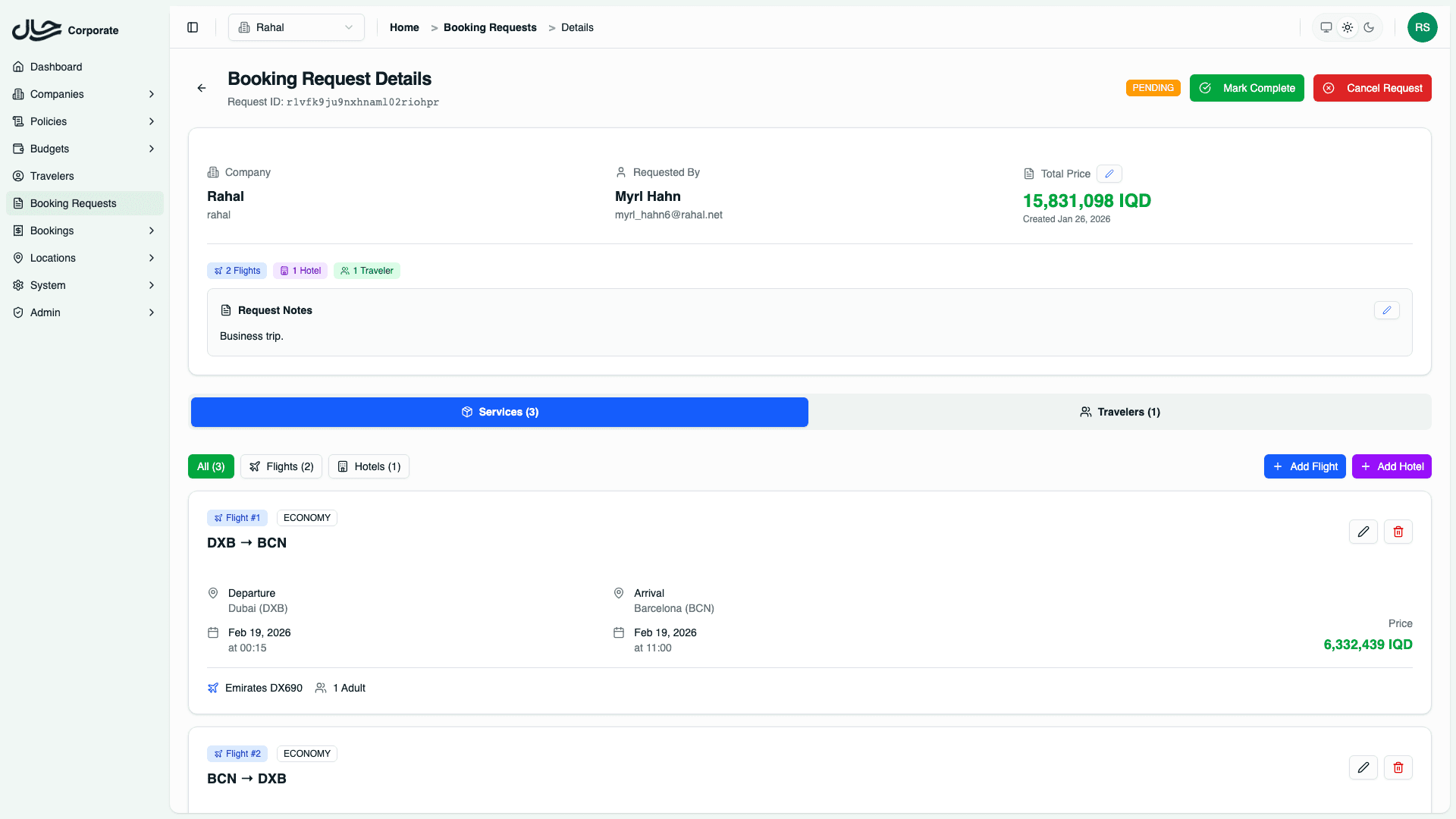
Completing a Request
Completing a request approves it for booking.
Open the Request
Navigate to the request detail page by clicking on it in the list.
Review All Details
Carefully check:
- Flight details (routes, dates, times, cabin class)
- Hotel details (property, dates, rooms)
- Traveler list and passport validity
- Total price accuracy
- Request notes for context
Click "Mark Complete"
The Mark Complete button is in the header area.
Confirm the Action
A confirmation dialog appears. Confirm to complete the request.
What Happens on Completion
When you mark a request as complete:
- Status changes to COMPLETED
- Budget confirmed — Reserved amount moves from pending to spent
- Request locked — No further modifications allowed
- Booking proceeds — Travel team can now make the actual booking
Completing the request doesn't automatically create the booking. It signals approval for the travel team to proceed with the actual reservation.
Cancelling a Request
Cancelling a request rejects it.
Open the Request
Navigate to the request detail page.
Document the Reason (Optional)
Edit the request notes to explain why the request is being cancelled. This provides valuable context for the user.
Click "Cancel Request"
The Cancel Request button is in the header area.
Confirm the Action
A confirmation dialog appears warning this is irreversible. Confirm to cancel.
What Happens on Cancellation
When you cancel a request:
- Status changes to CANCELLED
- Budget released — Reserved amount returns to available
- Request locked — No further modifications allowed
- User notified — Requester can see the cancelled status
Before Processing: Checklist
Flight Verification
| Check | Why |
|---|---|
| Dates and times | Ensure travel dates are correct |
| Routes | Confirm origin/destination are right |
| Cabin class | Verify class matches policy or has approval |
| Flight numbers | Check if flights are still available |
| Traveler count | Match against passenger needs |
Hotel Verification
| Check | Why |
|---|---|
| Check-in/out dates | Align with travel itinerary |
| Hotel selection | Verify property meets requirements |
| Room configuration | Correct occupancy per room |
| Board basis | Meals included as expected |
| Star rating | Within policy guidelines |
Traveler Verification
| Check | Why |
|---|---|
| Names | Match booking requirements |
| Passport validity | Valid for travel dates |
| Traveler types | ADT/CHD/INF correctly assigned |
| Contact info | Reachable for updates |
Pricing Verification
| Check | Why |
|---|---|
| Total accuracy | Sum of items matches total |
| Currency | Consistent across items |
| Budget impact | Within user's available budget |
Status-Based Actions
Action buttons are only visible for PENDING requests:
| Request Status | Available Actions |
|---|---|
| PENDING | Mark Complete, Cancel Request |
| COMPLETED | None (view only) |
| CANCELLED | None (view only) |
Processing Tips
Batch Processing Workflow
For efficient processing of multiple requests:
- Filter by Status: PENDING
- Sort by Created (oldest first)
- Open first request, review, process
- Use browser back or list link to return
- Repeat for next request
When to Modify Before Completing
Consider modifying the request before completion if:
- Prices have changed significantly
- Flights/hotels need adjustment
- Travelers need to be added/removed
- Notes need updating for clarity
See Editing Requests for modification details.
When to Cancel vs. Request Changes
| Scenario | Action |
|---|---|
| Completely inappropriate request | Cancel |
| Minor adjustments needed | Modify, then complete |
| User needs to resubmit with different options | Cancel (with notes) |
| Pricing outdated | Modify pricing, then complete |
Notifications
Currently, status changes are visible to users when they view their requests. Email notifications for status changes may be added in future updates.
Audit Trail
All processing actions are logged:
| Data Captured | Purpose |
|---|---|
| Who processed | Admin accountability |
| When processed | Timeline tracking |
| Previous status | Change history |
| New status | Current state |
This information is available for compliance and auditing purposes.
Common Scenarios
High-Value Request
For requests significantly over budget:
- Review policy violation details (if captured)
- Check if justification is in notes
- Verify business need
- Escalate if needed before processing
Urgent Travel Request
For time-sensitive travel:
- Prioritize in processing queue
- Verify flights are still available
- Complete promptly if approved
- Communicate timeline to travel team
Request with Multiple Policy Violations
When a request has multiple issues:
- Review each violation
- Determine if all are acceptable
- Consider partial approval (modify to remove violations)
- Document decision in notes
Duplicate Request
If user submitted the same request twice:
- Identify the duplicate
- Cancel one (preferably the older one)
- Note the duplicate in cancellation reason
- Process the remaining request normally