

Tracking Requests
How to view and monitor your booking request status
Tracking Requests
After submitting a booking request, you'll want to track its status and review the details. This guide shows you how.
Accessing Your Requests
Go to My Trips
Click My Trips in the main navigation.
Select Requests Tab
The page has three tabs:
- Requests — Your booking requests (pending and processed)
- Upcoming — Confirmed reservations for future travel
- Past — Completed travel history
The Requests tab is selected by default.
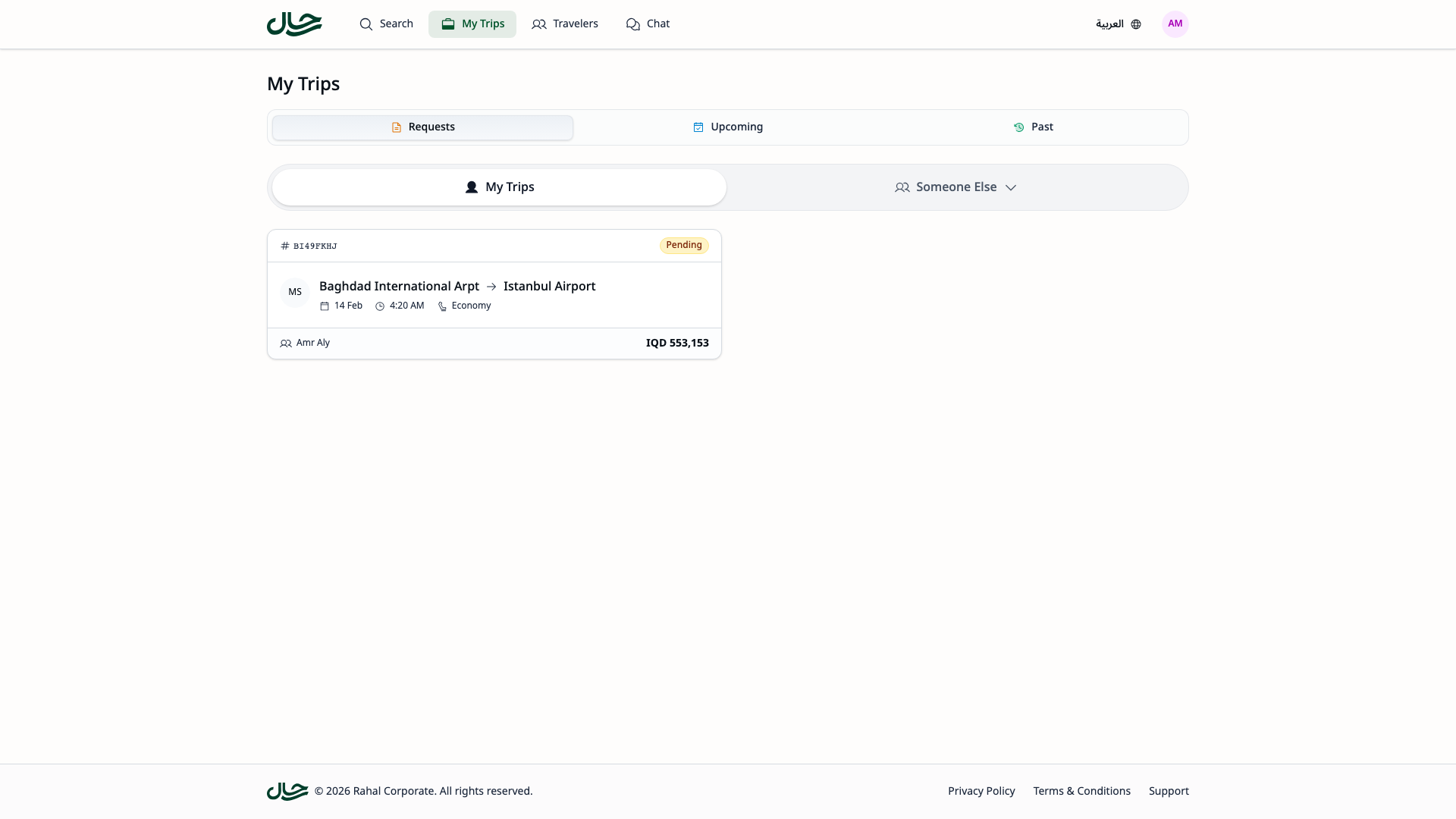
Request List View
The requests list shows all your booking requests in a card grid:
Card Information
Each request card displays:
| Element | Description |
|---|---|
| Service Icons | Icons for flights and hotels with counts |
| Total Price | Combined cost with currency |
| Status Badge | PENDING, COMPLETED, or CANCELLED |
| Created Date | When you submitted the request |
| Traveler Count | Number of travelers on the request |

Filtering Requests
You can filter your request list by status:
| Filter | Shows |
|---|---|
| All | All requests regardless of status |
| Pending | Only requests awaiting review |
| Completed | Only approved requests |
| Cancelled | Only rejected/withdrawn requests |
Click a filter button to apply it.
Viewing Request Details
Click any request card to open the detail page.
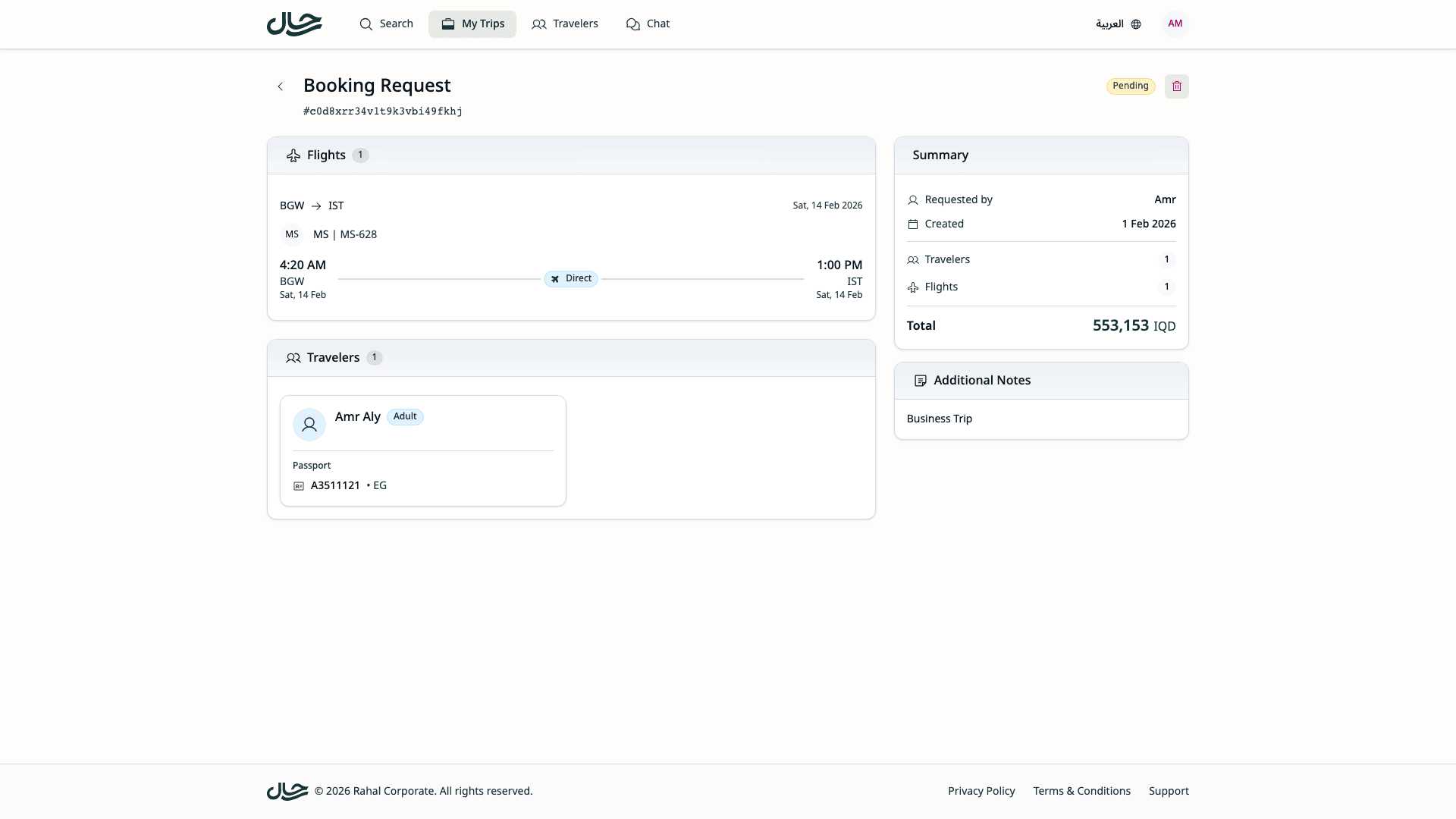
Detail Page Layout
The detail page is organized into sections:
Header
- Back button — Return to the request list
- Page title — "Booking Requests"
- Request ID — The unique identifier (shown below title)
- Status badge — Current status
- Cancel button — Only visible for PENDING requests
Main Content (Left Column)
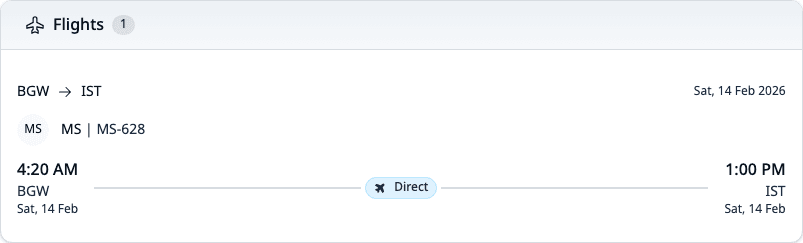
Flights Section
Shows each flight in your request with:
- Route (origin → destination)
- Departure and arrival date/time
- Airline and flight number
- Cabin class
- Passenger counts by type
Hotels Section
Shows each hotel in your request with:
- Hotel name and star rating
- City/location
- Check-in and check-out dates
- Room configurations with board basis
Travelers Section
Shows a grid of traveler cards with:
- Full name with title
- Traveler type (Adult/Child/Infant)
- Contact information
- Birth date
- Nationality
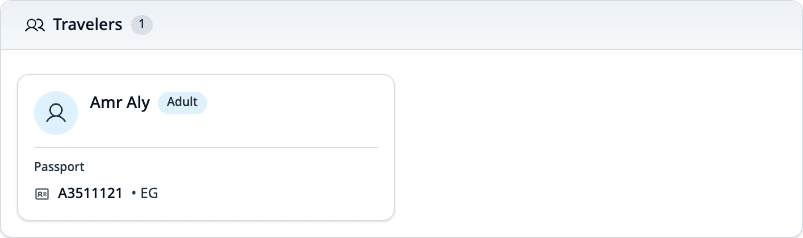
If your request has more than 4 travelers, click Show All to see everyone.
Notes Section
Displays any notes you added when submitting the request.
Summary Sidebar (Right Column)
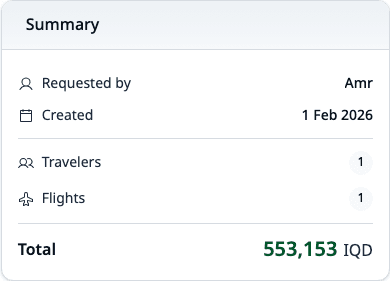
- Requested By — Your name
- Created At — Submission date
- Travelers — Count
- Flights — Count
- Hotels — Count
- Total — Combined price
Understanding Request Status
Pending
Your request is waiting to be reviewed by an administrator.
What to expect:
- Admin will review all details
- Admin may modify items before approval
- Processing time varies by company
- You can cancel if plans change
What you can do:
- View all request details
- Cancel the request if needed
- Wait for admin decision
Completed
Your request has been approved by an administrator.
What this means:
- Your travel is approved
- Travel team will make the actual booking
- Budget is confirmed (moved from reserved to spent)
What you can do:
- View the approved details
- Wait for booking confirmation
- Check your confirmed bookings in the Flights/Hotels tabs
Cancelled
Your request was rejected by an admin or withdrawn by you.
What this means:
- No booking will be made
- Budget reservation is released (if any)
- You may need to submit a new request
What you can do:
- View the request for reference
- Submit a new request with different options if needed
Checking for Updates
Currently, request status updates are visible by viewing the request:
- Return to My Bookings → Requests
- Check the status badge on your request
- Open the detail page for full information
Email notifications for status changes may be added in future updates. For now, check the app periodically or contact your travel admin for updates.
Request History
All your requests are kept in the system:
- Completed requests for approved travel
- Cancelled requests for historical reference
- Use filters to find past requests
Common Questions
How long will my request take to process?
Processing time depends on your company's workflow. Contact your travel administrator if a request is pending longer than expected.
Can I see why my request was cancelled?
Check the request notes—admins often add explanation when cancelling requests.
What if the admin modified my request?
When you view a completed request, you'll see the approved version which may differ from your original submission if the admin made changes.
Can I resubmit a cancelled request?
You'll need to go through the booking flow again and submit a new request. The original cancelled request cannot be reopened.